
Table of contents
Omnichannel ties all of this together. It is when someone realizes they don’t have to explain their problem for the third time and quietly relaxes their shoulders. And this is the article that will get you there. We will explain what omnichannel customer service is and how you can build a strategy that actually works instead of adding more chaos.
What Is Omnichannel Customer Service?

Omnichannel customer service is a way businesses interact with customers across multiple channels while keeping the experience smooth and connected.
Unlike multichannel support, which simply provides multiple options, omnichannel ensures that the customer experience is unified – a conversation that starts on one channel can continue on another without losing context.
For example, if someone starts a support request on social media and moves to email or live chat, the context carries over. They don’t have to repeat themselves, and the brand responds consistently every step of the way.
Why Omnichannel Customer Service Matters: 5 Key Benefits For Your Business
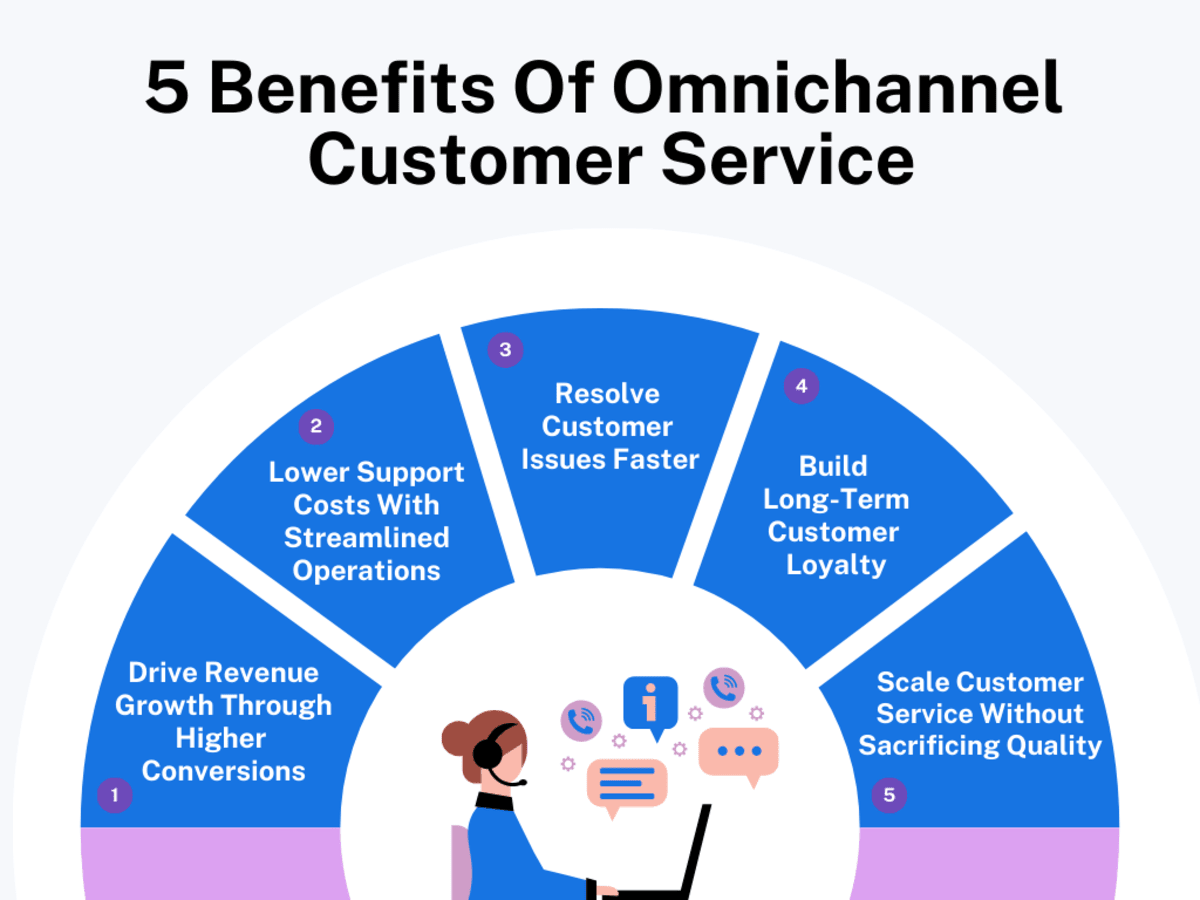
Omnichannel customer service changes everything when it is done right. Here’s how it actually helps your business, in ways that hit your revenue and keep your team sane.
1. Drive Revenue Growth Through Higher Conversions
Omnichannel customer service removes dead ends in the entire customer journey.
Someone asks about shipping on Instagram and finishes the order on your site – all with the same history carried forward. No starting from scratch. That continuity reduces hesitation and shortens decision time.
Here’s what typically improves once everything connects:
- Agents see browsing history and past orders instantly.
- Personalized product suggestions happen in real time.
- Abandoned cart conversations convert instead of disappearing.
- Sales conversations continue across various channels rather than dying after one reply.
Support stops being a cost center and becomes a revenue partner. Each interaction has a clear path toward checkout – without pushing or sounding salesy.
2. Lower Support Costs With Streamlined Operations
Scattered systems create duplicated work. Customer service agents retype notes. Customers repeat information. Managers download reports from 5 tools. Multi-channel customer service reduces that waste.
Here’s what changes:
- One conversation thread across multiple communication channels instead of separate tickets.
- Centralized customer records instead of multiple profiles per person.
- Automated routing sends issues to the right person instantly.
- Self-service deflects repetitive “status” and “where is my order” inquiries.
That means fewer touches per ticket and fewer escalations. Hiring pressure drops because the team finally works inside one organized workflow instead of patching together disconnected customer service software.
3. Resolve Customer Issues Faster Across Every Channel
Speed is not about typing faster. It is about context. With omnichannel support, agents open one dashboard and instantly see:
- Previous interactions – across ALL channels
- Order history, refunds, and shipping updates
- Internal notes from teammates
- Any automation already applied
This helps shorten resolution times and increase customer retention because decisions happen on the spot. You are not forwarding threads. You are not repeating troubleshooting steps. You are not transferring someone 3 times because the right team didn’t see the ticket. Every second shaved off is saved at scale – and that compounds daily.
4. Build Long-Term Customer Loyalty Through Consistent Experiences
Trust happens when your brand behaves the same way everywhere.
Multichannel customer service ensures:
- The same tone and policies across different channels
- The same status updates whether someone calls or chats
- Clear expectations that don’t change between agents
- Data accuracy because everything syncs from one source
A consistent omnichannel customer experience removes the risk. Customer engagement improves because they know what to expect every time – on every channel. Reliability turns into repeat business because your service increases customer satisfaction.
That same reliability also shows up publicly. When people see consistent answers and follow-through, it becomes easier to grow your influence on Facebook, LinkedIn, X, and other socials because trust builds long before anyone is ready to buy.
5. Scale Customer Service Without Sacrificing Quality
Growth exposes weaknesses. Ticket volume spikes. New agents join. Processes crack.
Omnichannel prevents that spiral by creating structure:
- Knowledge bases connect to every channel.
- Macros, templates, and workflows keep responses aligned.
- Skills-based routing assigns complex issues to senior agents automatically.
- Training becomes easier because the team uses one customer service platform, not 7.
You add various communication channels without multiplying headaches. You onboard new hires faster because everything is already documented and unified. Leadership finally sees real performance data across the entire operation in one view. Agent productivity doesn’t deteriorate when your ticket volume doubles.
How To Build An Omnichannel Customer Service Strategy In 7 Easy Steps

If you want your support to actually work instead of just exist, you need a strategy that doesn’t let sales leak. Here are 7 steps to set it up perfectly.
1. Audit Your Current Customer Support Ecosystem
Start by admitting this: most support setups are patched together. Someone added live chat one year ago. A ticketing tool later. Social inbox after that. Now, nobody actually knows how everything works as a whole.
This step isn’t about fixing anything yet. It is about exposing reality – what happens from the customer’s first message to the final resolution, across every tool and channel.
Do This:
- Trace 20 tickets from start to finish – literally click through every step, and write where information disappears or duplicates.
- Document every login your team uses and why – Customer Relationship Management (CRM) software, helpdesk, chat, payments, shipping, fraud, phone system. Note where the data stops.
- Flag any task agents do outside tools (personal spreadsheets, sticky notes, side chats). Those are system failures, not habits.
- Compare “official process” vs “what actually happens.” They are usually different. Capture the gap, not the theory.
- Calculate manual touches per ticket. If 3 or more actions aren’t automated, mark that workflow as broken.
2. Map Every Customer Journey & Touchpoint
You have to see your business from the customer’s side – in motion, not abstract.
Seamless customer journeys aren’t pretty flowcharts. They are messy. Someone discovers a problem on mobile, switches to desktop, asks on a phone call, then follows up later on email. Mapping the customer journey exposes exactly where context disappears and where the conversation stalls. Omnichannel only works when the path is understood in detail.
Do This:
- Build separate journeys for: buying, tracking, damage claims, exchanges, subscription issues, password recovery – no merging.
- Write the exact message customers usually send at each step instead of generic labels like “support inquiry.”
- Mark every point where customers switch digital channels and write what information the next agent doesn’t see.
- Identify “decision moments” – places where the brand says yes/no/refund/replace. Then note who decides and on what basis.
- Add internal time gaps (how long your team waits before acting) instead of estimating. Use timestamps.
3. Choose The Right Support Channels For Your Audience
Omnichannel does not mean “be everywhere.” It means choosing channels your audience actually uses – and committing to run each one properly.
Every added channel increases workload, context-switching, training, reporting complexity, and quality risk. So selection must be intentional. The goal here is reliability. And it is not only the support that runs smoother. It quietly helps improve product discovery and sales because people get help exactly where purchase decisions happen.
Do This:
- Pull origin data. Identify which channels naturally generate conversations today – don’t assume, check logs.
- Assign a purpose to each channel – e.g., chat = purchase help, email = documentation-heavy issues, phone = urgent resolution, social = visibility control.
- Set hard response standards per channel and publish them internally, so there is no improvisation when volume increases.
- Reject any channel that can’t sync history into your core omnichannel customer support platform. If it can’t unify, it doesn’t qualify.
- Run a controlled 30-day trial before committing – monitor workload, accuracy, and escalation patterns, then decide.
4. Build A Unified Customer Data Architecture

Right now, most companies have scattered data. One profile in the help desk, another in the CRM, something different in the email platform — and none of it lines up.
Unified data architecture means one identity per customer, shared across every system.
When someone reaches out, the record shows customer preferences, purchase history, promises made, and outcomes – all in one place.
Do This:
- Define a single customer ID and make every platform store data against that ID only.
- Create a data map listing what each system collects (orders, tickets, refunds, browsing) and where that data is ultimately stored.
- Standardize field names – “Order ID” should not be “Purchase Ref” somewhere else. Consistency prevents mismatches.
- Set rules for data ownership (who updates addresses, who edits notes, who controls status changes) to avoid overwrites.
- Turn on bi-directional syncs so changes in one tool instantly update everywhere, not just one direction.
5. Select An Integrated Help Desk, CRM, & Communication Stack
Tools don’t create omnichannel. But the wrong tools absolutely destroy it.
Once data is unified, the tech stack must support it without workarounds. The help desk, CRM, phone system, chat, social inbox, and email platform should operate like parts of one product. The goal here is simple: one workspace, full context, minimal toggling, no duplicate records.
Do This:
- List baseline requirements first (native integrations, unified inbox, conversation history, automation, APIs), then evaluate vendors only against those.
- Run live workflow tests – create a fake issue and track it across phone → email → chat. Note every break or manual step.
- Check audit trails so every change (refunds, exceptions, edits, reassignments) is permanently logged.
- Confirm role-based permissions. Agents and admins should access different levels without sharing logins.
- Verify reporting alignment – make sure metrics from each channel roll into the same dashboards instead of exporting spreadsheets.
6. Create A Central Knowledge Base & Content Standards
Omnichannel collapses fast when answers vary by channel. A single knowledge base prevents that. And no, this isn’t just articles. It is policy logic, troubleshooting flows, decision boundaries, refund conditions, shipping rules – everything support relies on.
Then come standards: how articles are structured, how steps are written, how updates are tracked. When answers are consistent, agents stop improvising, and customers stop bouncing.
Do This:
- Build article types (how-to, policy explanation, troubleshooting tree, internal-only, customer-facing) and label clearly.
- Write in steps first, explanation second, so agents can resolve quickly without reading essays.
- Attach each article to a system owner (billing, logistics, product) and schedule quarterly reviews.
- Version every change – new dates, changelogs, and reason for update. No silent edits.
- Link articles directly inside tickets so agents can access the exact rule instead of searching manually.
7. Train & Empower Teams With Processes & Manuals
With structure in place, people need practical guidance. Manuals turn uncertainty into predictable action: when to escalate, when to approve, what information to capture, what language to use, and what outcome applies. When support teams know exactly how to operate, consistency becomes automatic.
Do This:
- Create role-specific onboarding paths – new agents don’t need admin workflows, admins don’t need step-by-step macros.
- Build scenario drills – angry order dispute, missing shipment, warranty claim, subscription error. Practice live inside the tools.
- Define escalation criteria with examples — dollar limits, fraud indicators, policy breaks, VIP handling.
- Record short screen-share tutorials (2–5 minutes each) for recurring workflows instead of long lectures.
- Run monthly calibration sessions. Review past tickets and align on what “correct” should be across every channel.
5 Omnichannel Customer Service Challenges & How To Overcome Them

Omnichannel customer support sounds great until you hit the real-world problems. Let’s look at the 5 biggest challenges and exactly how to fix them.
1. Fragmented Customer Data Across Multiple Platforms
This happens when every tool stores a different piece of the story. Support agents open 5 tabs, guess what is current, and accidentally miss the key context. A refund shows one thing, the subscription shows another. And nobody knows which record is actually right. Decisions turn slow. Mistakes multiply.
How to Overcome: Pick one system to act as the “record keeper” and force every other system to sync into it using structured fields, not notes. Then run a full data audit, merge duplicates, and lock rules so future entries follow the same structure every single time.
2. Difficulty Maintaining Consistent Messaging Across Channels
A customer gets one answer on chat and something totally different on social. Trust drops instantly. This usually happens because customer service teams reply based on memory instead of controlled guidance.
On social channels, this damage compounds fast. Conflicting answers in public comments or private DMs don’t just hurt trust with one person. They slow your ability to increase your base on YouTube, Instagram, and other socials because new followers watch how problems are handled before deciding to stay.
How to Overcome: Create channel-specific response templates tied to approved policy language, and ask agents to link to the source explanation when replying. Update those templates centrally, so changes roll out everywhere in one move.
3. Adapting Quickly To Evolving Customer Expectations
Customer behavior changes fast. Today, they want instant chat. Tomorrow, they prefer asynchronous replies. Meanwhile, your workflows are frozen in place. That gap becomes visible very quickly.
How to Overcome: Set a quarterly review where support, product, and ops review real transcripts and trend data, then agree on one thing to test that matches what customers expect – not 10. Ship it, measure it, and standardize only when it clearly improves resolution time or customer satisfaction scores.
4. Measuring ROI & Impact Of Omnichannel Efforts
Leadership asks what all this investment actually accomplishes, and the answer is vague. Tickets resolve faster – but by how much? Customers stay longer – but is support the reason?
How to Overcome: Link every metric to a business outcome before reporting. Response time connects to repeat purchase. First contact resolution connects to churn. Build dashboards around those relationships, not vanity support metrics.
5. Delivering Personalized Support Without Over-Automation
Automation saves time, until it starts sounding robotic and irrelevant. Customers sense they are just being routed, not understood.
How to Overcome: Use automation only for routing, authentication, and data collection, then switch to human responses with specific references to the account context already captured. Automation prepares the conversation. Humans finish it.
5 Omnichannel Customer Service Examples To Inspire Your Strategy
Some companies are actually making omnichannel customer service work, and hard. Here are 5 examples that do it right and give you ideas you can steal.
1. Custom Sock Lab

Custom Sock Lab does something subtle but powerful. They treat the art approval process like a full customer service workflow. When someone places an order, the first email isn’t “Thanks, we got it.” Instead, the customer gets a short intro from a real person, plus a timeline showing when mockups arrive, when revisions close, and when production locks.
Then, every design revision happens inside one persistent thread. If the buyer switches from email to phone, the rep already has file versions and earlier comments open – so they talk specifics like, “I’m looking at your second revision where we moved the logo 4mm upward – do you want the outline thicker or keep it as is?”
They also send side-by-side mockups instead of single preview files, because they have learned that most delays come from people not knowing what changed. And when production starts, they send a short “last-chance” message that explains what can still be edited (like packaging) and what is now locked (like colors and patterns), which prevents angry follow-ups.
It is not flashy omnichannel. It is practical continuity – and it saves days on every order because no one has to repeat context or restart conversations.
2. DialMyCalls

DialMyCalls doesn’t try to make every issue fit into live chat. Instead, they teach customers how to choose the right channel – and support gets faster because of it.
When someone opens chat and asks about message delivery failures, the agent reviews logs for thirty seconds, explains what they saw, and says something like, “This gets solved quickest if we jump to a call – I’ll record the exact carriers that blocked your messages and walk you through one change that fixes it.”
Then, they book the call right there and send a calendar link, so the user doesn’t wander off. Meanwhile, smaller questions – like pricing clarifications or how to import contacts – stay in chat and get answered in under two minutes.
Email is positioned very differently: it is used for audits and compliance questions, where screenshots and sample messages get attached and reviewed by specialists. DialMyCalls has effectively trained customers that chat = fast navigation, phone = diagnosis, email = investigation. Support volume doesn’t shrink, but resolutions do.
3. EXT Cabinets

EXT Cabinets treats support as something that continues years past the install, and that is where their omnichannel approach stands out.
A homeowner might first reach them through an online quote form, where they upload photos and rough measurements. After purchase, the conversation doesn’t disappear. They receive installation texts the week cabinets ship, with reminders like, “Keep the boxes inside for 24 hours to stabilize temperature.”
Once installation is finished, the email switches tone completely. Instead of sales language, customers get maintenance checkpoints at 12 months and 24 months. Each message explains one specific thing – how humidity affects hinges, when to use touch-up kits – and always includes a direct reply option that routes straight to the same rep from the original order.
If something breaks, they don’t ask customers to start from scratch. The team already has the model, finish, order date, and install notes, so the call starts with: “You bought the WeatherGuard line in slate. Send two photos, and I’ll ship replacements today.”
That continuity across time is their real advantage. Customers never reintroduce themselves, and the company never treats warranty support like a brand-new conversation.
4. Brain Ritual

Brain Ritual’s migraine support does something very grounded in real life – they connect customer service directly to how a person manages migraines day to day. When someone orders magnesium and riboflavin, the interaction doesn’t stop at checkout. The confirmation email includes a short “setup link” that opens a migraine-tracking mini-form.
Customers log trigger patterns, timing of headaches, and sleep changes. Within 48 hours, a real specialist replies by SMS with one specific adjustment, like “separate your magnesium into two doses, morning and night, for two weeks.”
Support then moves wherever the customer is. If they reply to that SMS with updates, the same thread continues. If they scan the QR code printed on the bottle, it opens WhatsApp with their history already visible to the rep. No one asks them to repeat anything.
When headaches spike around shipment time, the team switches to email so they can share longer instructions, including vitamin interactions and step-by-step timing for supplements around meals. Customer service becomes part of migraine management, not a separate chore.
5. Astroideal

Astroideal treats omnichannel customer service as one continuous client file, even though astrology services usually feel fragmented. That is what makes their approach stand out.
A customer might start on the website by booking a birth chart reading. The confirmation email already includes the astrologer’s name, a clear delivery window, and a WhatsApp number tied to that exact order. When the chart is delivered by email, the same thread stays active for follow-ups.
If the customer switches to WhatsApp, the astrologer sees the full chart, past questions, and the delivery notes. They also use chat for guidance and email for documentation. Short clarifications happen on chat within minutes. Detailed remedies, charts, and future timelines always arrive by email so clients can save and revisit them.
For complex cases, support schedules a short call and shares a written summary afterward in the same thread. The experience feels personal without feeling scattered. Every channel reinforces the same conversation and the same outcome. That consistency keeps customers engaged across services and repeat consultations.
Conclusion
Omnichannel customer service is what makes your business stop apologizing and start delivering. Customers notice results. They notice speed. They notice that they can actually get things done without banging their head against confusion. So, do the work and make your business look like it has its act together – even on its worst days.
At Smartsupp, we built our live chat and multichannel dashboard to be simple out of the box – easy to install, easy to customize, and easy to scale. On top of that, Mira, our AI Shopping Assistant, can handle a huge chunk of routine questions even when your team is offline, recommend products based on your product catalog, and hand over the conversation with context intact when a live agent needs to step in.
Try Smartsupp for free and see how quickly it becomes the backbone of your customer interactions.