Head start over the competition on Allegro and Kaufland: how to get into the Top offer and the Buy Box step by step
:quality(55))
:format(avif):quality(55))
Explore with us the proven techniques for getting your goods into the Top offer on Allegro and into the Buy Box on Kaufland Global Marketplace.
Every online store should have strategies for placing products better on the advertising platforms it uses
Working on placing your products as high as possible in the search results of the marketplaces and comparison sites you have chosen is crucial for winning new customers. But not every online store makes use of it, which is why you have another opportunity here to stand out and get ahead of competing sellers.
Focus on supplying specific and correct product data, so that you can compete for the first unpaid positions in the search results of the platforms you use.
How do you make connecting to Allegro and Kaufland Global Marketplace easier?
With the Mergado Marketplaces app you upload your product listings from your XML feed, match the products to the catalogue and synchronise stock levels every 15 minutes. In Mergado you improve your product data in bulk and get it easily into Allegro or Kaufland.
How to get into the Allegro Top offer
This position guarantees the product maximum visibility among the unpaid search results and on product pages. Showing selected listings in the leading positions can significantly increase the number of sales.
If your product matches the algorithm's criteria and comes out as competitive, Allegro places it among the Top offers automatically as the representative of that type of goods. Shoppers only see the other listings after clicking the "COMPARE X OFFERS OF THIS PRODUCT" button.
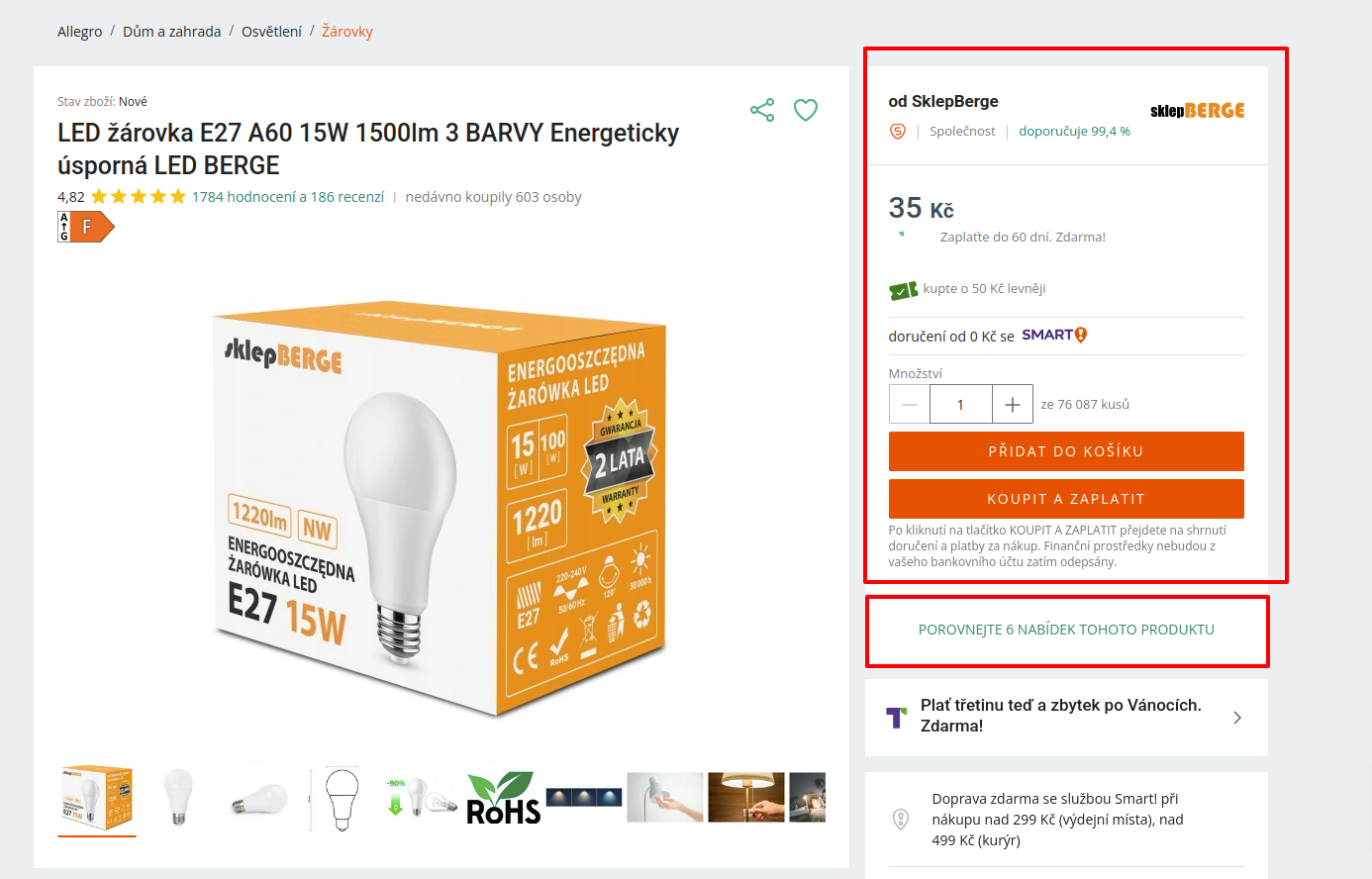
An example of a Top offer on Allegro. Source: allegro.cz
Shoppers will see the Top offer in these places:
In the search results
They are placed right after the sponsored listings and have higher priority than other products.
In categories
If a customer browses a specific product category, Top offers may appear in the first places in the list of products in that category.
On the home page
In some cases Allegro may create sections on its home page or in its newsletters presenting products that its algorithm has placed among the Top offers.
What Allegro takes into account when choosing the Top offer for a given product
The product price
Seller quality
Filling in the mandatory parameters
The main image meeting all the requirements
Delivery time
Product condition
Buyer activity – all the information that tells Allegro's algorithm whether the listing was interesting, for example how often the listing appeared in the list of offers in response to user queries, how many times the listing was displayed, or how many times the goods from the listing were bought.
TIP: Learn how to succeed on Allegro for free, right at the start of your expansion!
Register for the free webinar, where we will introduce how Allegro works and go through a practical demonstration of how to upload products to Allegro with the Mergado Marketplaces app and solve the basic problems.
How to win the Kaufland Buy Box
This is a premium position that highlights one seller for a particular product in the purchasing interface of the product page. If several online stores offer the same product, the Kaufland algorithm takes several different factors into account and automatically determines which seller will be placed in that product's Buy Box. That way it is more likely that customers will buy from that seller, because their goods are more visible and the likelihood of completing the sale is higher there.
If your product meets the requirements of the algorithm's rules, Kaufland places it in the Buy Box automatically. The customer only sees the other listings after clicking the "Offers from other sellers" button.
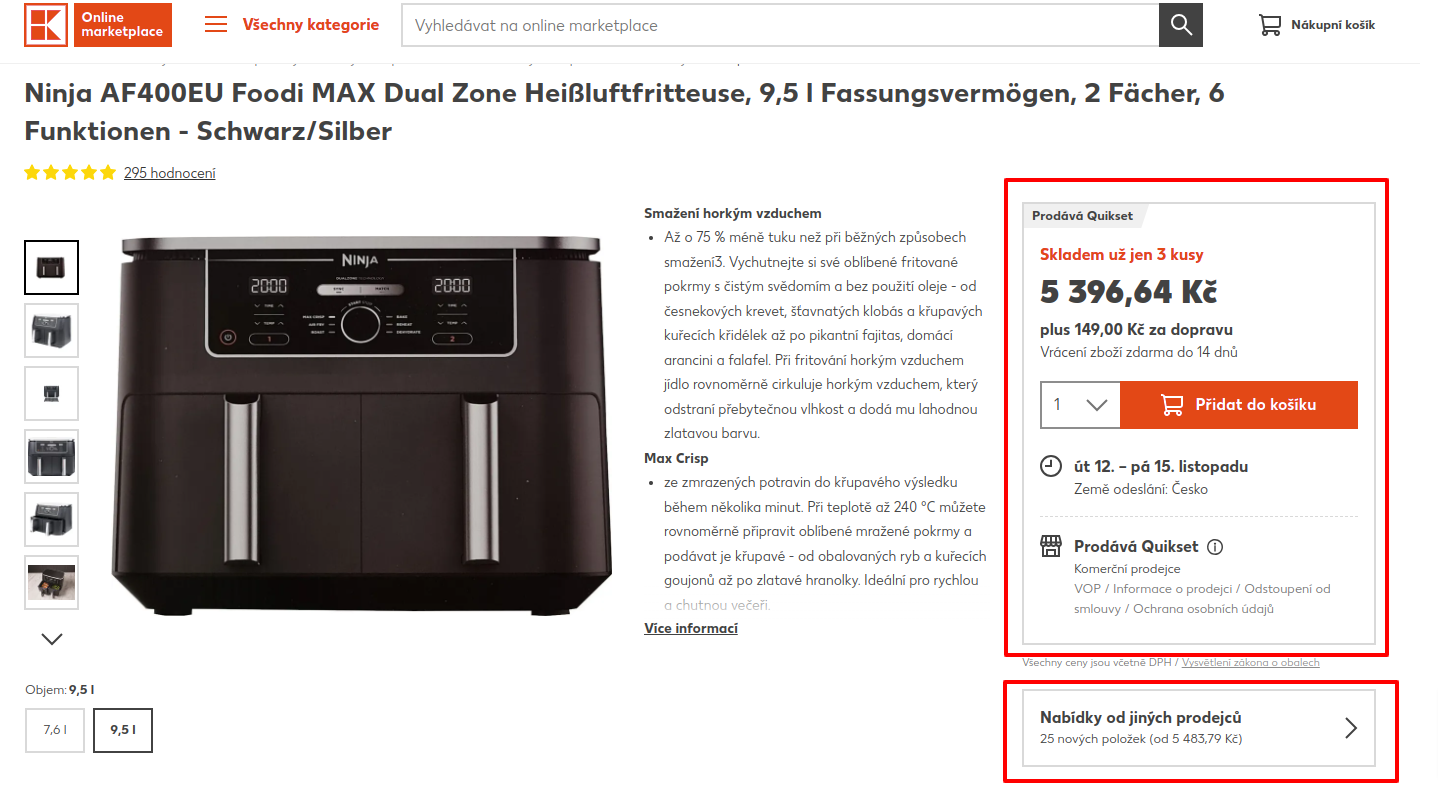
Buyers will see the Buy Box on the product page. The Buy Box is usually in the right-hand part next to the product description, where the "Add to basket" button is. If there are several sellers offering the same product, the Buy Box usually shows the listing with the best parameters.
What does Kaufland take into account when choosing a product for the Buy Box?
the price including shipping
the delivery time including the order processing time
the account rating, which counts any delays to orders
the seller's answers to customer questions
Where you can see what to do to get into the Buy Box
In Kaufland's Seller's Portal:
go to the Reports section and generate a report on your comparison with the competition – its data will show you where you stand with your individual prices and what to do to get to first place in the Buy Box
changing the price by a few crowns or speeding up delivery can often help you move up the rankings
in the Analyses and statistics part, click the Make full use of your sales potential block
there you will get information about your sales and an overview of your total turnover, the number of orders, the conversion rate, your share of the Buy Box and so on
Kaufland focuses on the lowest price
On Kaufland Global Marketplace the lowest price is the key factor. The concept of a "minimum price" allows for dynamic adjustment, where the seller sets the price they do not want to go below. That way it helps filter out the best offers and places the product in the leading positions accordingly.
TIP: This video will advise you how to increase sales on Kaufland!
Watch the webinar recording, where Dominika Hrazdírová from Mergado and Filip Drábek from Kaufland will teach you how to succeed in the pre-Christmas campaigns on Kaufland Global Marketplace this year with the help of the Mergado Marketplaces app.
Using complete and correct product data matters, so that the shopping experience is as good as possible for the customer. With its help you can climb higher in the search results on both Allegro and Kaufland Global Marketplace. That will bring you better turnover and build a more trusting relationship with your customer.